
Most neck massagers need about 1 to 4 hours to charge, depending on the model and battery size. A typical neck massager takes around 2 to 3 hours to reach a full charge and may run for about 3 to 4 hours afterward.
Some models charge in about an hour, while others need closer to four hours. The indicator light usually shows charging progress, but users should check the product manual for exact meanings and charging limits.
Key Takeaways
- Most neck massagers charge within 1 to 4 hours.
- Battery life often lasts about 3 to 4 hours.
- The manual provides the most accurate charging guidance.
Typical Charging Timeframes
Most neck massagers charge in 1–3 hours, depending on battery size and design. The user manual remains the best source because charging times vary between models.
Standard Battery Models
Standard cordless neck massagers commonly need about 1–2 hours for a full charge. One model charges in roughly one hour and provides up to four hours of use, or about 16 sessions lasting 15 minutes each.
Many models include a 15-minute automatic shutoff. This feature ends each session, so a full battery may support several sessions rather than continuous operation.
| Battery type | Typical charge time | Common use |
|---|---|---|
| Standard rechargeable battery | 1–2 hours | Several 15-minute sessions |
| Smaller portable battery | About 1 hour | Short daily sessions |
The massager should use its supplied USB cable when possible. Some models accept power from a computer USB port or a 5V, 1–2A adapter. The charging indicator usually changes or stops flashing when the battery reaches full capacity.
High-Capacity Battery Models
Massagers with larger batteries often take 2–3 hours to charge fully. A Noova model, for example, lists an estimated charging time of two to three hours. The longer time reflects the battery’s greater capacity, not necessarily a fault.
A larger battery can extend use between charges, but the exact runtime depends on massage speed, heat, pressure, and session length. Models with heat may use power faster than models without heat.
The user should charge the device after use or when its low-battery warning appears. It should not remain connected longer than the manual recommends, even if it includes overcharge protection. The correct cable and a compatible USB power source help reduce charging problems.
Understanding Charging Indicators
Charging indicators show whether a neck massager is charging, fully charged, or low on power. The exact colors and signals vary by model, so the user should check the device manual before relying on a specific light pattern.
LED Light Meanings
Many neck massagers use a red light while charging. On some models, the red light turns off when charging finishes; others change to green, blue, or white. A blinking light often means the battery is still charging, while a steady light may indicate a full charge.
| Indicator | Common meaning |
|---|---|
| Red or blinking red | Battery is charging |
| Light off | Charging may be complete on some models |
| Green, blue, or white | Battery may be fully charged |
| Flashing or changing pattern | Check the manual for the model-specific meaning |
Most models take about 2 to 4 hours to charge. If the indicator does not change after the stated charging time, the user should check the cable, power adapter, and charging port.
App And Display Notifications
Some smart neck massagers connect to a phone app or include a small display. These systems may show the battery level as a percentage, a battery icon, or a message such as “charging” or “fully charged.” They can provide more precise information than a single LED.
The app may also warn when the battery is low or show whether the device has stopped charging. A user should keep the massager connected until the app shows a full battery, unless the manual gives different guidance.
If the app and the physical indicator show different statuses, the user should disconnect and reconnect the charger. Persistent errors may result from an unsuitable adapter, a damaged cable, or a battery fault.
Factors That Affect Recharge Duration
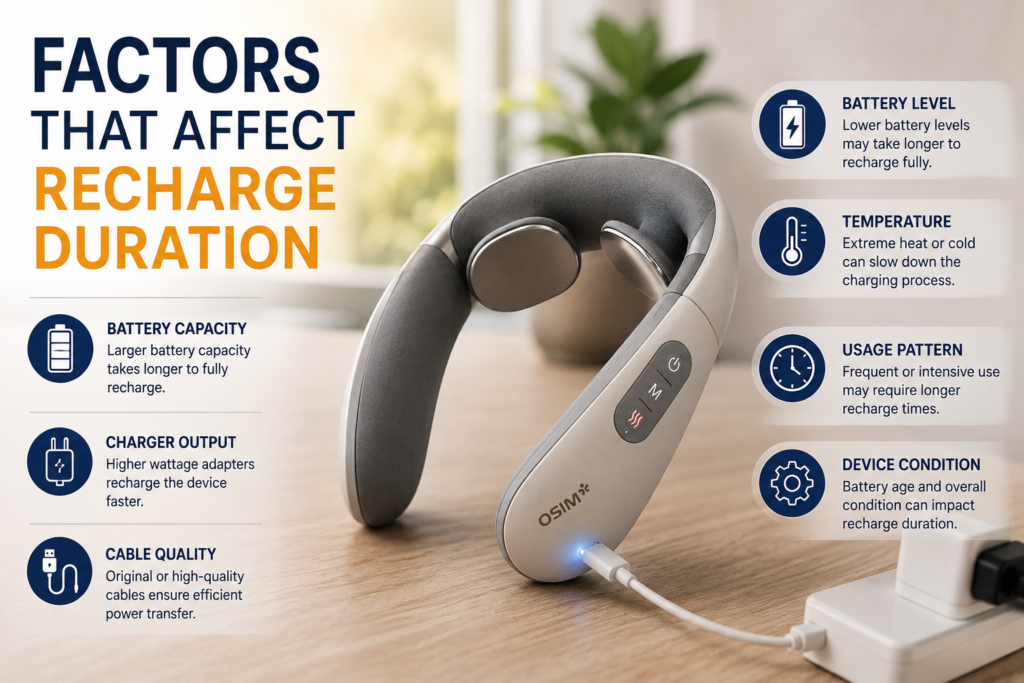
A neck massager’s charging time depends mainly on its battery size, the power source, and how much charge remains. Most models need about 2 to 3 hours, but the exact time varies by design and charger.
Battery Capacity
Battery capacity, measured in milliampere-hours (mAh), shows how much power the battery can store. A neck massager with a larger battery usually takes longer to charge than a smaller model when both use chargers with similar output.
For example, a 2,500 mAh battery generally needs more time than a 1,500 mAh battery. The larger battery may also provide longer use between charges, so its longer recharge time can support more operating time.
The manufacturer’s instructions provide the most accurate charging estimate. Battery age also matters. A worn lithium-ion battery may charge unevenly, lose capacity, or run down faster than it did when new.
Power Source Output
The charger and cable control how quickly the massager receives power. A wall adapter with suitable output will usually charge it faster than a low-power computer USB port. However, the adapter must match the voltage and charging requirements listed by the manufacturer.
| Power source | Likely charging effect |
|---|---|
| Manufacturer-supplied adapter | Usually the safest and most reliable option |
| Standard wall USB adapter | Often provides steady charging |
| Computer USB port | May charge more slowly |
| Damaged or poor-quality cable | Can cause slow or interrupted charging |
A USB-C cable does not automatically provide fast charging. The massager, cable, and adapter must all support the required charging rate.
Remaining Battery Level
A nearly empty battery takes longer to recharge than one that still holds a moderate charge. A massager at 20% may reach full power sooner than one at 0%, assuming both use the same charger and conditions.
Many lithium-ion devices also reduce charging speed near the end of the cycle. This protects the battery and helps prevent excess heat, so the final part of charging may take longer than the first part.
Charging in very cold or hot conditions can also slow the process. The massager should charge indoors at a normal room temperature, and it should remain switched off during charging unless the instructions allow use.
Charging Methods And Compatibility
Most neck massagers charge through a USB cable connected to a suitable wall adapter or computer port. Wireless charging docks are less common, so the massager must specifically support dock-based charging before a user places it on one.
USB Charging
Many neck massagers use USB charging with a 5V output. Some manuals specify 5V 1A, while others allow 5V 1–2A. The device label or user manual should take priority because the wrong charger may cause charging problems or damage.
A wall adapter usually charges faster than a laptop port because it can provide steadier power. A car USB outlet can also work if it supplies the required 5V output. The cable’s connector must match the massager’s charging port.
| Charging source | Compatibility | Typical guidance |
|---|---|---|
| Wall adapter | Usually compatible | Use the voltage listed in the manual |
| Computer USB port | Often compatible | Charging may take longer |
| Car USB outlet | Compatible when rated correctly | Confirm a stable 5V output |
| Fast-charge adapter | Not always suitable | Avoid it unless the manual permits it |
Charging commonly takes about one to two hours, but battery size and model design affect the exact time. Indicator lights often flash during charging and change color or stop flashing when the battery reaches full capacity. The device should be unplugged after it finishes charging, especially if the manual recommends this.
Wireless Charging Docks
Most neck massagers do not support wireless charging docks. A dock works only when the device includes compatible wireless charging hardware and has charging contacts or a matching receiver built into its design.
A standard phone charging pad cannot safely charge a massager unless the manufacturer specifically lists compatibility. Placing a noncompatible massager on a dock will usually produce no charge and could create heat if the contacts do not align correctly.
Users should check the product manual for the dock’s model number, alignment requirements, and indicator signals. They should also keep the dock and charging contacts dry and free of dust. If the massager includes a proprietary dock, its charging time may still fall within the product’s stated range, often around one to two hours.
How To Charge Safely
Safe charging depends on using the correct cable, a suitable power source, and good airflow. The massager should stay dry and cool while charging, and the user should follow the model’s manual because charging times often range from one to four hours.
Using The Recommended Cable
The user should charge the neck massager with the included cable whenever possible. Some models use USB-C, while others require a specific connector or charging dock. A cable that fits the port may still deliver the wrong power, so the user should check the manual before using a replacement.
A laptop USB port or a standard USB wall adapter often works when the manufacturer allows USB charging. The user should avoid damaged cables, loose connectors, and uncertified adapters. The USB standard explains why different USB connections can support different power levels, but the massager’s manual remains the main guide.
The user should place the massager on a stable surface during charging. The indicator light usually shows charging status, but light colors vary by model. A full charge may take about two to four hours, while some devices need longer.
Avoiding Overheating
The user should charge the massager in a cool, dry, open area. It should not sit under a pillow, blanket, or clothing because trapped heat can stress the battery. The device should also stay away from water, heaters, direct sunlight, and hot vehicles.
The user should stop charging if the massager becomes unusually hot, smells unusual, swells, leaks, or shows damage. They should unplug it and contact the manufacturer rather than opening the battery compartment. A mildly warm casing can be normal, but strong heat requires attention.
The user should unplug the charger after the manual’s recommended charging period. Modern devices often limit charging when the battery is full, but leaving any battery-powered product connected for long periods can add unnecessary heat and wear.
Maximizing Battery Performance
A full charge commonly takes 1–4 hours, depending on the model, battery size, and charger. Using the supplied cable, avoiding extreme temperatures, and charging the battery regularly can help maintain reliable performance.
Ideal Charging Habits
The user should check the manual before charging because models differ. Many neck massagers charge through USB and need about 2–3 hours, while some take up to 4 hours. The indicator light or battery icon usually shows when charging is complete.
The user should use the included cable and the recommended power adapter. A compatible adapter helps prevent charging problems. The device should remain switched off while charging unless the manual allows use during charging.
The user should unplug the massager after it reaches full charge, even if it has overcharge protection. They should also avoid charging it near water, under pillows, or in direct sunlight. For general information about rechargeable batteries, lithium-ion battery care provides useful background.
Storage Between Uses
The massager should be stored in a cool, dry place away from heaters, vehicles, and direct sunlight. Extreme heat and cold can reduce battery performance and may damage the battery over time.
If the device will not be used for several weeks, it should not be stored completely empty. A charge of about 40–60% is suitable for longer storage. The user should check the battery about once a month and recharge it if the level becomes low.
The charging port should remain clean and dry. The user should store the cable with the massager without bending it sharply. If the battery swells, leaks, becomes unusually hot, or develops a strong odor, the user should stop using the device and contact the manufacturer.
Troubleshooting Slow Or Failed Charging
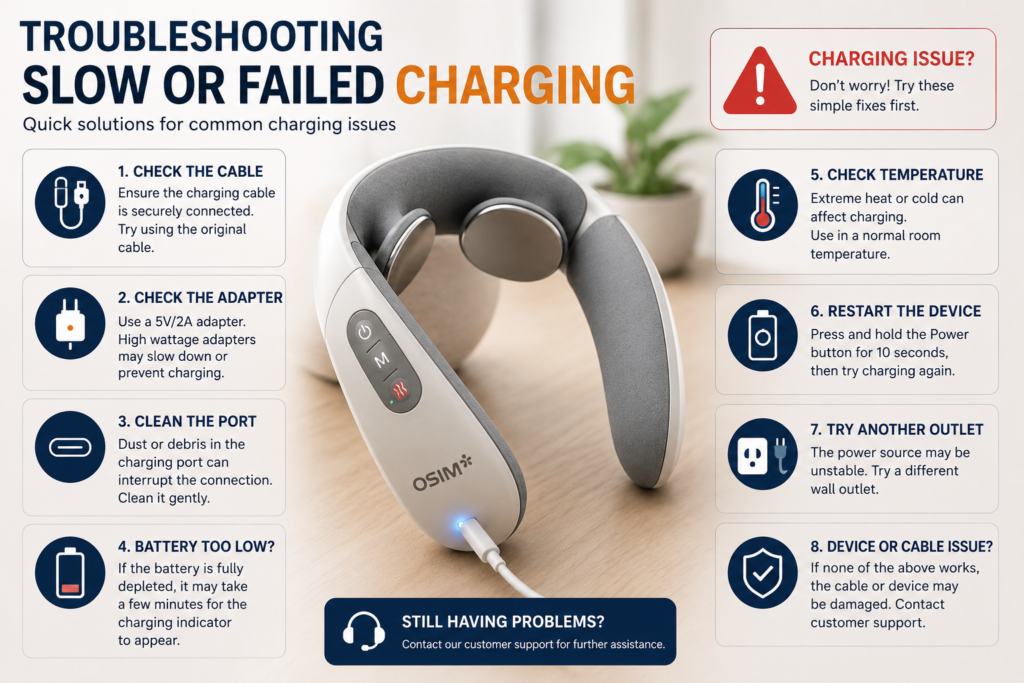
Slow charging often results from an unsuitable cable, a weak power source, or debris in the charging port. A damaged battery or charging circuit can also prevent the massager from charging or cause unusual indicator lights.
Checking Ports And Cables
The user should start with the included charging cable and the charger recommended in the manual. If the massager uses USB, a computer port may charge it more slowly than a wall adapter. A car outlet can work if it provides the correct USB power, but the adapter must match the device’s requirements.
The user should inspect both connectors and the massager’s charging port for lint, dirt, bent parts, or loose connections. The device should remain switched off while charging, and the cable should fit firmly without force. If the indicator does not light, the user can test another compatible power source and cable. They should avoid damaged cables, incorrect voltage adapters, and charging the device near heat or moisture.
When To Contact Support
The user should contact the manufacturer if the massager still fails to charge after testing a compatible cable and working power source. Support may need to assess a damaged port, faulty battery, or failed charging circuit. The user should provide the model number, purchase date, and a description of the indicator light or charging behavior.
A battery that becomes unusually hot, swells, leaks, smells strange, or loses power quickly requires immediate attention. The user should unplug the massager, stop using it, and avoid opening the casing or replacing the battery without approved instructions. If the product remains under warranty, unauthorized repairs could affect coverage.